Google Hides a Pokémon Game in Search—Here’s How to Find and Master It
Pokémon remains an unstoppable cultural force, and what better way to honor its milestone than with an interactive Easter egg by Google? If you’re a fan of classic Pocket Monsters or just love hunting down digital collectibles, there’s a playful minigame waiting for you directly in your browser or mobile device, no download required.
How to Start Catching Pokémon Directly From Google Search
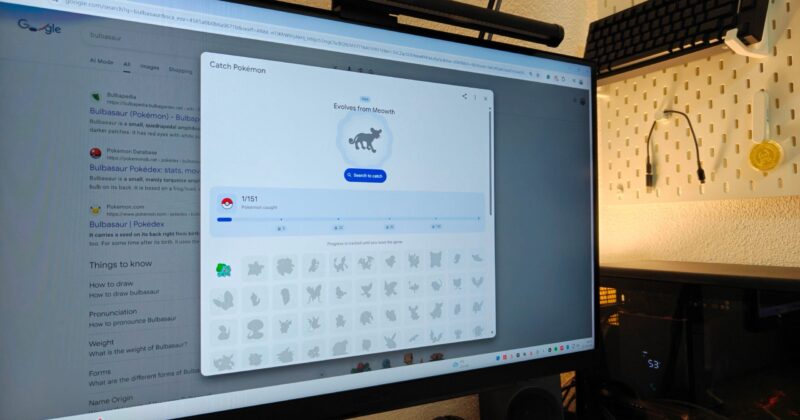
If you’re eager to fill a digital Pokédex, just search ‘Pokémon’ or any original Pokémon name using the Google app or your browser. At the bottom of your results, you’ll spot a Poké Ball icon. Tap or click it, and you’ll initiate your first catch—simple as that. Every time you search a new Pokémon name, you get another opportunity to nab these nostalgic creatures and add them to your collection.
The game is all about Generation I: that means the original 151 Pokémon from the classic era, making it a nostalgia bomb for longtime fans and a bite-sized introduction for newcomers. But the excitement doesn’t stop at simple captures: the game gives you cryptic silhouettes and helpful hints to help jog your memory, encouraging both trivia buffs and curious explorers to flex their Pokémon knowledge.
Pro Tips & Technical Details for the Catch Pokémon Mini-Game
Not every Pokémon is so straightforward to find in search. Pokémon with common English names—think ‘Persian’ or ‘Seel’—may show regular search results instead of the familiar game prompt. To get around this, just add the word ‘Pokémon’ to your search (for example: ‘Persian Pokémon’). Avoid extra details like evolutionary forms or regional variants; sticking to the exact names is key to triggering the Easter egg.
Advanced tip: For a handful of Pokémon variants, you’ll need a different approach to catch them all. Google’s hint system helps, but don’t hesitate to brainstorm names or think back to the original Pokédex order.
The real magic of this game unfolds on mobile, specifically within the Google app. Here, the catching animations and interactive experience are much richer than on desktop. Yet the catch mechanic is identical: search, spot the silhouette, and tap the Poké Ball to claim your prize.
Unlocking Legendary and Mythical Pokémon
Certain Pokémon—legendary and mythical Gen I icons—require you to collect Master Balls. You’ll begin to receive these powerful tools as you capture more Pokémon, unlocking the first Master Ball after just five successful catches. Further Master Balls become available at 20, 50, 100, and when you’ve caught nearly the entire set of 151. When you’ve secured a Master Ball, use it for the especially rare creatures Google’s game challenges you with.
Tips for Pokémon Masters—And How To Save Your Progress
Google syncs your collection across devices if you’re signed in, making it possible to continue your Pokédex journey from anywhere. Just remember: deleting your search history will wipe out your in-game progress. For those with a habit of clearing cookies, this is a crucial detail—think twice before mass-deleting data if you’re close to catching them all.
If you’re ever stuck on a shadowy silhouette or elusive name, don’t worry. It’s perfectly fair to ask a friend, post on social, or even have an AI assistant lend a hand. Just be sure your search leads to new discoveries instead of spoilers you’re not ready for!
For seasoned and casual fans alike, Google’s Pokémon minigame is a fresh spin on browser-based fun. It’s proof that even decades after Red and Blue first hit handhelds, the thrill of ‘catching ’em all’ hasn’t faded from digital culture.